LinkoraxWP
Smarter internal linking for WordPress.
LinkoraxWP helps WordPress site owners discover internal linking opportunities, improve link coverage, identify orphan posts, and manage internal links directly from the WordPress dashboard.
Intelligent Link Automation.
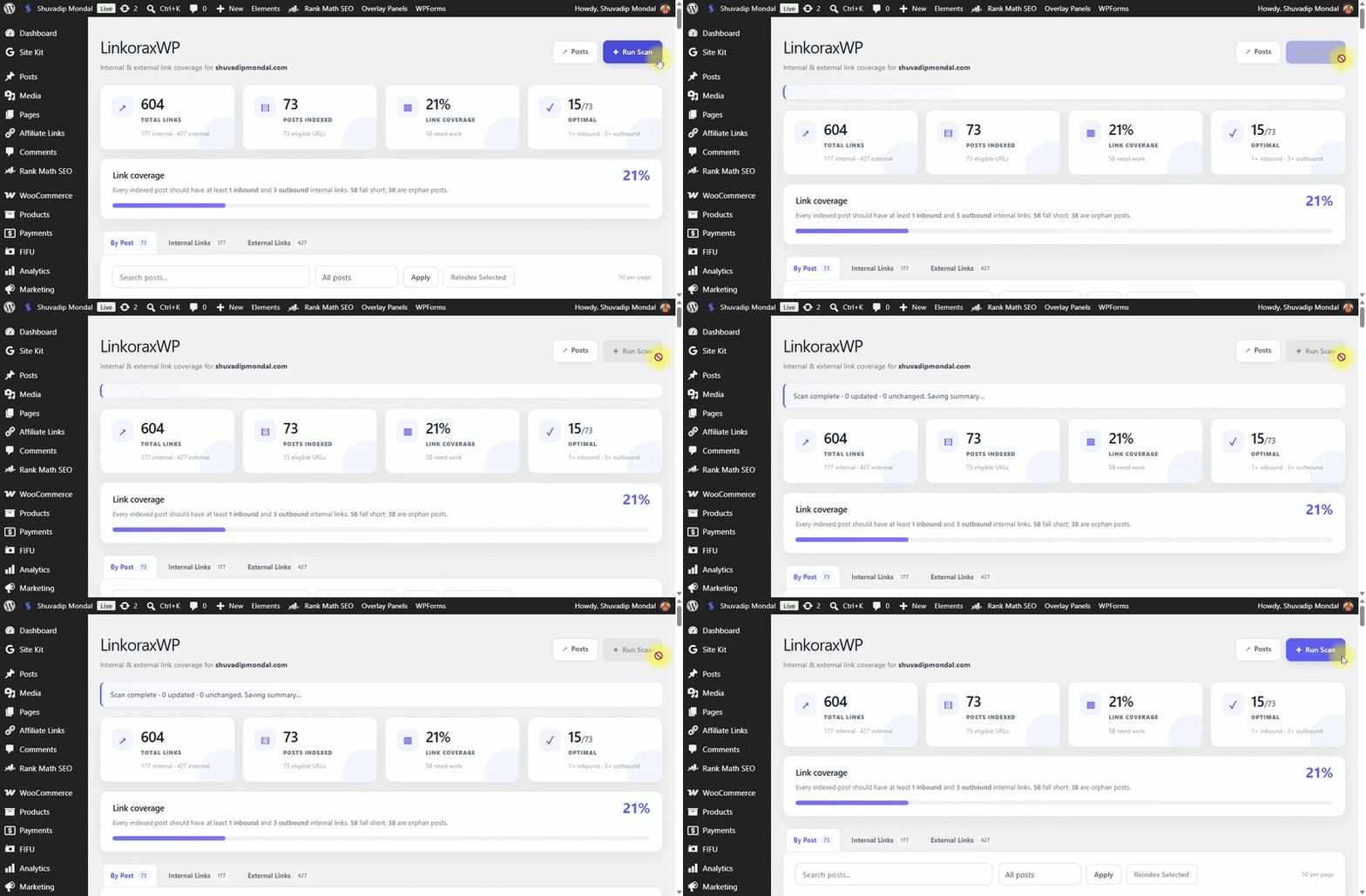
Watch our architecture in real-time.
1. Smart Hash Index
Scans published posts, generating lightweight content hashes to prevent unnecessary DB queries.
2. Coverage Audit
Evaluates every URL against the strict 1 inbound / 3 outbound benchmark for optimal site health.
3. Semantic Match
Analyzes titles, headings, and taxonomies to score contextual relevance between orphan pages.
4. In-Editor Anchor
Suggests contextual 2–6 word phrases directly inside the editor for seamless, natural insertion.
You're in good company.
Come grow with us.
Join a growing community of people who have chosen LinkoraxWP.
A community built around growing together.
From your content
to connected content.
Watch LinkoraxWP turn your WordPress content into a visible, manageable internal-link network.
Your content works hard.
LinkoraxWP helps connect it.
As your website grows, keeping every important page connected becomes harder. LinkoraxWP works like a helping hand — scanning your content, finding linking opportunities, showing coverage gaps and helping you manage the links that matter.
From scattered content
to a connected website.
LinkoraxWP gives you a clear view of your site's linking structure and helps you act on the opportunities it finds.
See the bigger picture
Scan your site and build an index of your content, links, headings, keywords and related content signals.
Find what needs attention
See link coverage, inbound and outbound links, orphan posts and content that needs more linking.
Discover contextual opportunities
Find related posts and natural anchor opportunities based on the relationship between your content.
Take control of every link
Add, edit or remove links, choose your anchor text and manage destinations directly from WordPress.
Coverage.
Context.
Control.
Zero bloat. Absolute precision. The only native WordPress linking engine built for exactly what matters.
Not just link suggestions.
A complete link engineering workflow.
Most tools either blindly spray links across keywords or bloat your database. LinkoraxWP runs a closed-loop system: Index → Measure Coverage → Semantic Match → In-Editor Insertion → Dedicated Management.
Every post is tested against a strict ratio: ≥1 inbound + ≥3 outbound links. Flags posts as Optimal, Needs Work, or Orphan instantly.
Calculates relevance percentages using title, headings, body text overlap, taxonomies, and meta descriptions—not just a basic title search.
Scans your target text to suggest multiple real sentence fragments as clickable chips right in the editor sidebar—preventing forced, unnatural links.
Stores unique content hashes to only re-index updated articles. Avoids high-CPU full-database rescans that crash shared hosting.
Inspect, update anchors, swap destinations, or delete both internal and external links directly from WP admin without opening the heavy page builder.
LinkWhisper
High database footprint and cumbersome legacy reports that lack a unified coverage target ratio.
Runs deep background queries without hash-differential checking, frequently causing high server load or memory timeouts on larger WordPress sites.
Suggests entire sentences where anchors are often awkwardly auto-selected, requiring tedious manual text editing before links read naturally.
Provides raw internal link counters and an orphan list, but lacks LinkoraxWP's target benchmark (≥1 inbound, ≥3 outbound) and triage sorting.
Managing links post-by-post often requires opening the full WordPress page editor rather than using a dedicated lightweight link management studio.
Questions? We've got answers.
Everything you need to know about LinkoraxWP.
What exactly does LinkoraxWP do?
Why do I need a dedicated internal linking plugin?
Can LinkoraxWP find orphan posts?
How does LinkoraxWP find relevant linking opportunities?
Does it suggest natural anchor text?
Can I choose the exact anchor text myself?
Can I manage existing internal links?
Can I manage external links too?
Does LinkoraxWP automatically add links without my approval?
Can I add a link directly from the WordPress editor?
How does the link coverage dashboard help me?
Can I see inbound and outbound links for each post?
Can I search and filter my posts?
What happens when I publish or change content?
Can I manually re-index my content?
Will LinkoraxWP change my existing content automatically?
Is LinkoraxWP a replacement for my SEO plugin?
Can LinkoraxWP guarantee higher Google rankings?
Is there a limit in the Free version?
Do I need coding knowledge to use LinkoraxWP?
You’ve seen the value.
Now remove the limits.
Your site is growing. Unlock the full LinkoraxWP engine and move beyond the 100-URL Free limit. Coverage | Context | Control.
1 Website
1 website license
- All Pro Features Active
- License Verified & Activated
1 Website
1 website license
- All Pro Features Active
- License Verified & Activated
5 Websites
Up to 5 websites
- All Pro Features Active
- License Verified & Activated
5 Websites
Up to 5 websites
- All Pro Features Active
- License Verified & Activated
Send Payment Screenshot & Get License
Submit your payment screenshot and required details and Get License via Email. Every payment is verified before your license is issued.
Submit all details after payment
Send your payment screenshot , name, email address so we can verify your payment and activate your LinkoraxWP Pro license.
Get LinkoraxWP Pro
Choose a plan, complete the payment, and upload your payment screenshot. Your payment will be verified manually before your license is issued.
1 Website
1 website license
- All Pro Features Active
- License Verified & Activated
Subscribe to YouTube, then click again to continue.
1 Website
1 website license
- All Pro Features Active
- License Verified & Activated
Subscribe to YouTube, then click again to continue.
5 Websites
Up to 5 websites
- All Pro Features Active
- License Verified & Activated
Subscribe to YouTube, then click again to continue.
5 Websites
Up to 5 websites
- All Pro Features Active
- License Verified & Activated
Subscribe to YouTube, then click again to continue.
Get LinkoraxWP Pro
Choose a plan, complete the payment, and upload your payment screenshot. Your payment will be verified manually before your license is issued.
Send Payment Screenshot & Details
Submit your payment screenshot and required details. Every payment is verified before your license is issued.
Submit all details after payment
Send your payment screenshot , name, email address so we can verify your payment and activate your LinkoraxWP Pro license.