
Create internal and external linking automatically in wordpress websites and Boost Ranking 15x.
You may have 20, 50, 100, or even thousands of pages on your WordPress website. You publish and update old posts. You create product pages, service pages, guides, and other useful content.
But there is one simple BIG problem that often gets ignored:
Are your pages properly connected to each other?
This is where internal links matter.

An internal link is simply a link from one page on your website to another page on the same website.
For example:
You write an article about WordPress speed and mention image optimization. You can link the words image optimization to another useful article on your website about optimizing images.
But when your website becomes large, finding these opportunities manually becomes difficult.
That’s where i get a new wordpress plugin very light weight 20kb only, name – LinkoraxWP.
But before that, listen me with little care!
Why Internal Links Are Important
Internal links help connect related content on your website.
They can help visitors discover more useful information instead of leaving after reading one page.
For example, imagine you have these articles:
- How to Start a WordPress Blog
- How to Choose a WordPress Theme
- How to Improve WordPress Speed
- WordPress SEO Guide
- How to Write Better Blog Posts
These articles are related.
But if they are not connected with useful links, visitors may never discover some of them.
Your content exists, but your website isn’t doing a good job of connecting it.
Good content should not live alone, like Human
The Problem Gets Bigger as Your Website Grows
Managing internal links on a small website is easy. You can remember your important pages and add links while writing.
But after publishing dozens or hundreds of posts, things change.
You may start asking:
- Which posts have no incoming links?
- Which pages are poorly connected?
- Which articles could link to each other?
- Where should I add a new internal link?
- Which pages already have too many or too few links?
- What useful anchor text can I use?
- Which old posts need attention?
Checking all of this manually can take a lot of time.
And that’s exactly the problem LinkoraxWP is designed to solve.
What Is LinkoraxWP?
LinkoraxWP is a WordPress plugin for analyzing and managing your website’s links.
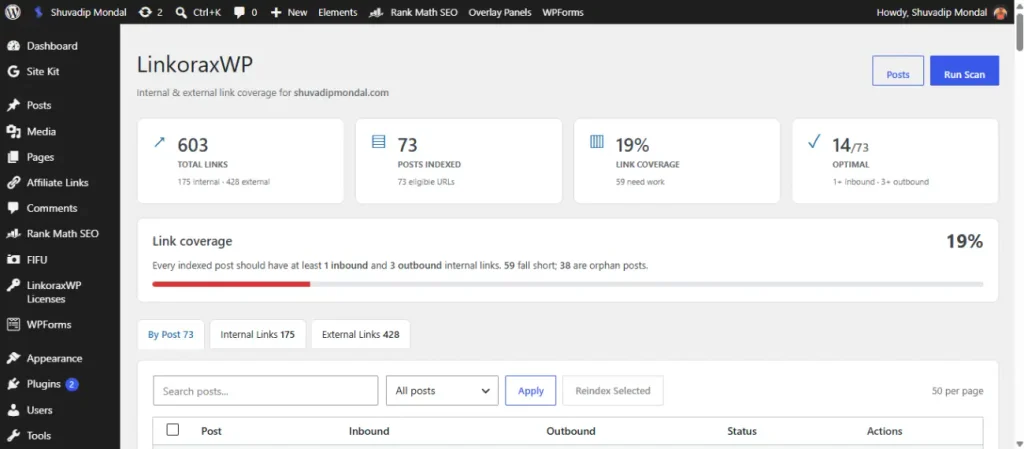
It gives you a clearer view of how your content is connected and helps you find useful internal linking opportunities.
Instead of opening every article and searching through your website manually, you can work from the WordPress dashboard.
LinkoraxWP can help you:
- Analyze internal links
- Find posts with weak link connections
- Identify orphan posts
- Discover relevant linking opportunities
- Find natural anchor text
- Add and manage links
- Edit or remove links
- Review external links
- Re-index your content when needed
LinkoraxWP
Automatic internal & external linking for WordPress — set it up once, let it work for you.
Get the PluginThe goal is simple: Make your existing content easier to connect and manage.
Everything you need to know
about LinkoraxWP.
Simple answers about internal linking, link management, and how LinkoraxWP works with your WordPress website.
01 What exactly does LinkoraxWP do?
LinkoraxWP analyzes your WordPress content, finds internal linking opportunities, identifies weak or orphaned posts, and helps you manage your links from the WordPress dashboard.
02 Why are internal links important?
Internal links connect related pages on your website. They help visitors discover more of your content and give you a clearer structure for managing your site.
03 Can LinkoraxWP find orphan posts?
Yes. LinkoraxWP can identify posts with little or no incoming internal links so you can find content that needs better connections.
04 How does LinkoraxWP find linking opportunities?
It analyzes your indexed content, including titles, headings, keywords, phrases, taxonomies, and content similarity to find relevant connections.
05 Can it suggest natural anchor text?
Yes. LinkoraxWP can find natural phrases already present in your content and suggest them as potential anchor text.
06 Can I choose the anchor text myself?
Yes. You stay in control. Choose a suggested phrase, select an existing phrase in your content, or enter your own anchor text.
07 Can I add and edit links from WordPress?
Yes. You can add, edit, and remove links directly from the LinkoraxWP interface inside your WordPress dashboard.
08 Does LinkoraxWP manage external links?
Yes. LinkoraxWP can detect, count, and display external links alongside your internal links.
09 Does LinkoraxWP automatically change my content?
No. LinkoraxWP helps you discover opportunities and gives you control over which links and anchors you actually add.
10 Can I see my site’s link coverage?
Yes. The dashboard gives you a site-wide view of your internal linking structure and highlights posts that are optimal, need work, or are orphaned.
11 Can I see inbound and outbound links for each post?
Yes. LinkoraxWP shows inbound and outbound internal-link information so you can understand how each post is connected.
12 Can I search and filter my content?
Yes. You can search indexed content and filter posts by states such as All Posts, Needs Work, Orphan, and Optimal.
13 Can I re-index my website?
Yes. You can scan your site and re-index selected content when you want to refresh your linking data.
14 Is LinkoraxWP a replacement for my SEO plugin?
No. LinkoraxWP focuses specifically on your site’s links, including link discovery, coverage, anchor suggestions, and link management.
15 Will LinkoraxWP guarantee higher Google rankings?
No. No plugin can guarantee #1 rankings. BUT, can guarantee 100% ranking improvement. LinkoraxWP helps you build a more organized, relevant, and manageable internal linking structure.
16 Is there a limit in the Free version?
Yes. The Free version supports up to 100 eligible URLs. Pro removes the URL limit and unlocks the Pro feature set.
17 Do I need coding or SEO knowledge?
No. LinkoraxWP is designed to be managed from your WordPress dashboard without requiring coding knowledge.
18 Who is LinkoraxWP made for?
Bloggers, publishers, affiliate sites, business websites, content sites, and WordPress site owners who want a clearer way to manage their internal links.
What Is an Orphan Post?
An orphan post is a page that doesn’t receive useful internal links from other pages on your website.
- Imagine you publish a very useful article.
- Google can find it.
- The article is good.
- But none of your other articles link to it.
- A visitor reading your website may never discover it.
- That’s why finding these pages can be useful.
LinkoraxWP can identify posts with little or no incoming internal links so you can decide which ones need better connections.
Find Linking Opportunities Inside Your Existing Content
You don’t always need to write another article.
Sometimes the opportunity is already sitting inside an article you’ve published months ago.
For example, suppose you have an article that says:
“A fast WordPress website provides a better experience for visitors.”
And you already have another article about WordPress website speed. That’s a natural opportunity for an internal link.
LinkoraxWP analyzes your indexed content and can help identify relevant pages that could be connected. You can then decide whether the suggested link actually makes sense. You stay in control.
Use Natural Anchor Text
Anchor text is simply the clickable text of a link.
Instead of writing:
Click here
you might naturally link a phrase such as:
WordPress website speed
when that phrase fits the page you’re linking to.
LinkoraxWP can look for natural phrases already present in your content and suggest them as possible anchors.
- You can choose the phrase you want to use.
- You can also choose your own anchor text.
You Don’t Have to Let a Plugin Change Everything Automatically
This is important.
LinkoraxWP is not about blindly adding hundreds of links to your website.
It helps you find opportunities and gives you control over the final decision.
You can review a suggestion and ask:
“Does this link actually help the reader?”
- If yes, add it.
- If not, skip it.
That keeps your internal linking decisions useful and relevant.
See Your Link Structure From One Dashboard
One of the biggest advantages of having a dedicated tool is visibility.
Instead of checking posts one by one, LinkoraxWP gives you a centralized view of your site’s linking structure.
You can see things such as:
- Total indexed content
- Internal links
- External links
- Link coverage
- Posts that need attention
- Orphan posts
- Well-connected posts
You can also filter your content to focus on the areas that need attention first.
Manage Links Without Leaving WordPress
You don’t need to maintain a separate spreadsheet just to remember where your links are.
- LinkoraxWP lets you manage links from the WordPress dashboard.
- You can add, edit, and remove links associated with your posts.
- You can also search indexed posts and select the destination you want to link to.
- This makes link maintenance much easier as your website grows.
Does Internal Linking Guarantee Better Google Rankings?
No.
And no honest WordPress plugin should promise that.
Search rankings depend on many things, including content quality, search intent, competition, technical SEO, website quality, links from other websites, and Google’s systems.
But internal linking is still an important part of organizing your website to RANK.
A well-connected website can make it easier for visitors to discover related content and gives you a clearer structure for managing your pages.
LinkoraxWP helps you manage that part of your website.
Start With the Content You Already Have
You don’t always need more content.
Sometimes you need to make better use of the content you’ve already published.
Start by finding:
- Posts with no useful incoming links.
- Posts that could link to related articles.
- Natural phrases that could become useful links.
- Important pages that need more connections.
- Old content that has become disconnected.
Then improve those connections one by one.
That’s a much simpler approach than trying to fix your entire website at once.
Meet LinkoraxWP
LinkoraxWP was built to make internal linking easier for WordPress website owners.
It helps you see your links, find opportunities, choose natural anchors, and manage your connections from WordPress.
No complicated process. No need to manually remember every URL.
Just a clearer way to manage the links between the content you already created.