Google officially launched Custom Annotations in Search Console on November 17, 2025, after months of testing. This feature lets you add contextual notes directly to your performance charts, acting as a “personal notebook” for your search data. Here’s everything you need to know about this game-changing feature.
Key specifications and limits for Google Search Console custom annotations feature
What Are Custom Annotations?
Custom annotations are personal notes you create yourself to mark important events on specific dates in your Search Console performance charts. They appear as visual markers on your graphs, helping you understand why traffic, clicks, or rankings changed at particular times.
Two Types of Annotations:
- System Annotations: Auto-generated by Google to show data processing issues
- Custom Annotations: Your own notes marking site changes, campaigns, or events
Google Search Console’s new custom annotations feature lets users add personal notes to performance charts for better context
Key Specifications & Limits
- Character Limit: 120 characters per annotation
- Maximum Annotations: 200 per property
- Auto-Delete: Annotations older than 500 days are automatically removed
- Visibility: All users with property access can see your annotations
- Cannot Edit: You can delete and recreate, but not edit existing annotations
- Not Visible In: Comparison mode or 24-hour views
How It Helps SEO Professionals
Algorithm Update Tracking
- Mark exact start and end dates of Google core updates
- Correlate traffic drops/spikes with confirmed algorithm changes
- Distinguish between algorithm impacts and your own site changes
- Track recovery periods after updates (typically 2-4 weeks)
SEO Experiment Documentation
- Record A/B test start dates and configuration changes
- Track plugin implementations and their performance impact
- Document schema markup additions or technical SEO fixes
- Monitor results of title tag and meta description optimizations
Technical Change Tracking
- Site migrations and template updates
- HTTPS migrations and their ranking effects
- Broken link fixes and 404 error resolutions
- Core Web Vitals improvements and speed optimizations
Performance Attribution
- Explain traffic spikes to clients or stakeholders
- Connect specific SEO efforts to measurable results
- Build timeline of optimization decisions and outcomes
- Improve causal inference when analyzing traffic patterns
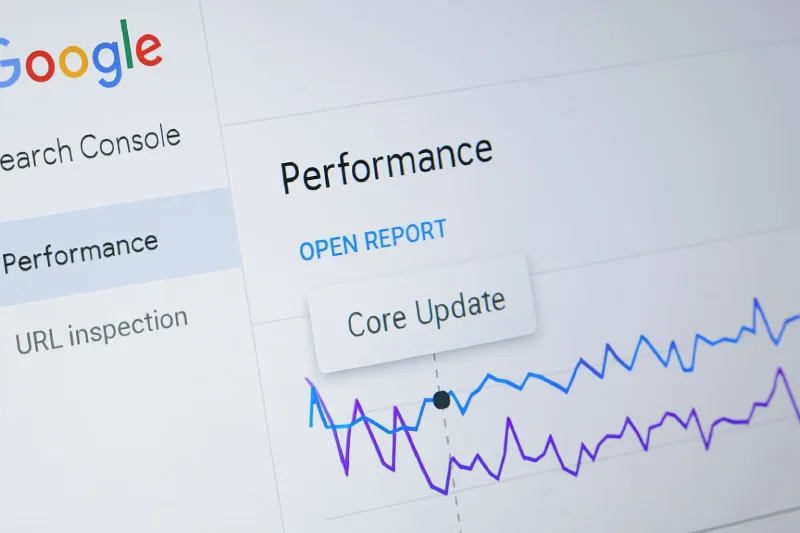
Screenshot of Google Search Console performance graph with a custom annotation labeled “Core Update”
How It Helps Bloggers
Content Performance Tracking
- Mark dates of major content launches or blog post publications
- Track viral content impact on overall site traffic
- Document content refresh dates and their ranking effects
- Monitor seasonal content performance year-over-year
Niche Event Documentation
- Mark industry-specific events affecting your niche traffic
- Track trending topic coverage and its traffic impact
- Document collaborations, guest posts, or mentions
- Record when you covered breaking news or viral stories
Content Strategy Shifts
- Note changes in content focus or target audience
- Track keyword targeting strategy modifications
- Document shifts from informational to commercial content
- Monitor user intent alignment changes
Social Media Integration
- Correlate social media campaigns with search traffic
- Track Instagram Reel or YouTube Short viral impacts
- Document influencer collaborations and their effects
- Monitor cross-platform promotional campaign results
How It Helps Marketers & Agencies
Campaign Attribution
- Track product launch dates and search performance impact
- Document promotional event timing (Black Friday, seasonal sales)
- Measure email marketing campaign effects on organic search
- Monitor paid advertising spillover to organic traffic
Client Reporting & Communication
- Provide clear context for traffic changes in client reports
- Build compelling data narratives with timeline markers
- Explain both positive and negative performance shifts
- Create standardized documentation across client properties
Team Collaboration
- Share visible markers keeping entire teams aligned
- Document who made what changes and when
- Facilitate smoother team handovers and transitions
- Maintain institutional knowledge across personnel changes
Multi-Channel Attribution
- Connect offline events (TV ads, print) with online traffic
- Track holiday and seasonal business cycles
- Document partnership launches and co-marketing efforts
- Monitor competitive landscape changes and their impacts
Step-by-step process to add custom annotations in Google Search Console
How to Use Custom Annotations: Step-by-Step

Adding an Annotation:
- Open your Performance Report in Google Search Console
- Right-click on the performance chart at your desired date
- Select “Add annotation” from the context menu
- Choose the specific date using the date picker
- Type your note (maximum 120 characters)
- Click “Add” to save your annotation
- The annotation appears as a marker on your chart
Viewing Annotations:
- Scroll along the timeline to find annotation markers
- Hover over markers to see the full note and date
- Compare notes with traffic changes (clicks, impressions, CTR)
- Annotations appear regardless of filters applied
Deleting Annotations:
- Click the annotation marker on the chart
- Select “DELETE” in the annotation pop-up
- Confirm deletion on the following screen
- Remember: You cannot edit, only delete and recreate
Best Practices for Using Annotations
Use Consistent Naming Format
- Structure:
Type – Description – Owner - Example:
Content – 20 new product pages – Sam - Example:
Tech – HTTPS migration completed – Dev team - Example:
Update – March core update impact – SEO
Document Both Dates for Events
- Mark both start and completion dates for major updates
- Track 2-4 week windows after algorithm updates for lagging effects
- Monitor false stabilizations before declaring recovery
- Use rolling windows for comprehensive impact analysis
Separate Internal vs. External Events
- Tag your own site changes differently from Google updates
- Distinguish algorithm events from technical deployments
- Track external factors (holidays, news events) separately
- Create clear categories for easier future reference
Maintain Privacy & Professionalism
- Avoid sensitive personal information (names, phone numbers)
- Keep notes professional—they’re visible to all property users
- Don’t include confidential business data or internal conflicts
- Remember: Anyone with access can see your notes
Create an Annotation Habit
- Add annotations immediately when making changes
- Include them in your deployment checklist
- Set reminders for major Google update announcements
- Review annotations in monthly retros to identify patterns
Be Strategic with Limited Space
- With only 200 annotations per property, prioritize major events
- Focus on changes likely to impact search performance
- Avoid trivial updates that won’t help future analysis
- Consider creating a separate change log for minor updates
Common Use Cases by Priority
High-Priority Events to Annotate:
- Google core algorithm updates (start and end dates)
- Site migrations and major technical changes
- Content strategy overhauls or major launches
- Security issues or site downtime periods
- Major design or navigation changes
Medium-Priority Events:
- Plugin or tool implementations
- Seasonal campaigns and promotions
- Content refreshes on high-traffic pages
- Link building campaigns or PR mentions
- Schema markup additions
Lower-Priority Events:
- Individual blog post publications (unless major)
- Minor text updates or typo fixes
- Routine maintenance activities
- Small image optimizations
Advanced Tips for Maximum Value
Combine with Performance Segments
- Filter by page group, country, or device before reviewing annotations
- Segment data to see deeper patterns around specific changes
- Use annotations with query-level filtering for keyword insights
Integrate with Other Tools
- Use third-party tools like GSC Guardian for bulk CSV import
- Combine with Google Analytics annotations for complete picture
- Export annotation data for dashboard integration
- Sync with project management tools for workflow alignment
Build a Comprehensive Timeline
- Create annotations for both positive and negative events
- Include context about WHY you made changes, not just WHAT
- Add external context (competitor changes, industry news)
- Reference related annotations in your notes when space allows
Use for Predictive Analysis
- Identify seasonal patterns by reviewing past years’ annotations
- Spot which types of changes consistently drive results
- Learn from failed experiments documented in annotations
- Build institutional knowledge for future strategy
Limitations to Be Aware Of
Technical Constraints:
- 120-character limit constrains detailed documentation
- Cannot edit annotations after creation (only delete/recreate)
- No attribution metadata showing who created each note
- Not visible in comparison mode or 24-hour views
- Auto-deleted after 500 days (about 16.5 months)
Collaboration Challenges:
- All users can delete any annotation (no ownership control)
- No notification system when annotations are added/deleted
- Risk of annotations being removed by mistake
- Difficult to coordinate in large, multi-user teams
Privacy Concerns:
- Visible to everyone with property access
- Includes restricted users (view-only access)
- Cannot hide sensitive internal information
- Creates potential for inappropriate notes
Impact on SEO Workflow & Reporting
Improved Decision-Making
- Turn raw data charts into actionable insights
- Reduce time spent searching memory or old Slack messages
- Make data-driven decisions with complete context
- Avoid repeating past mistakes by documenting failures
Enhanced Client Communication
- Reports become narratives instead of just numbers
- Easily explain why metrics moved in specific directions
- Build trust through transparency and documentation
- Justify ongoing SEO investments with clear attribution
Team Efficiency Gains
- Reduce meetings needed to explain historical changes
- Smoother onboarding for new team members
- Better coordination across distributed teams
- Preserved knowledge when team members leave
Quality Control & Testing
- Track controlled experiments systematically
- Correlate specific optimizations with results
- Identify which tactics work for your specific site
- Build evidence-based SEO strategies over time
Comparison: GSC Annotations vs. Third-Party Tools
Native GSC Advantages:
- Free and built directly into Search Console
- No additional tools or subscriptions required
- Official Google data integration
- Accessible to everyone with GSC access
Third-Party Tool Advantages:
- Bulk import capabilities for historical data
- Algorithm update markers pre-loaded
- More annotation types and categories
- Better team collaboration features
- Longer retention (no 500-day limit)
- Cross-property annotation management
Popular Third-Party Options:
- GSC Guardian (Chrome extension with bulk CSV import)
- SEOTesting (annotations at site, page, and query level)
- Looker Studio (custom annotation layers on GSC data)
Real-World Application Examples
Example 1: E-commerce Site
- Date: November 25, 2024
- Annotation:
Campaign – Black Friday sale launched – Marketing - Result: Track traffic spike correlation with promotional event
Example 2: Blog
- Date: March 10, 2025
- Annotation:
Content – Core Update start (March 10-24) – SEO Team - Result: Monitor ranking changes during and after update
Example 3: SaaS Company
- Date: June 15, 2025
- Annotation:
Tech – New product page templates deployed – Dev - Result: Measure impact of structured data implementation
Example 4: Local Business
- Date: December 20, 2024
- Annotation:
Event – Holiday closure Dec 24-Jan 2 - Result: Explain expected traffic drop during closure
Future Implications & Evolution
Google’s addition of custom annotations signals their commitment to making Search Console a comprehensive SEO workflow platform rather than just a reporting tool. This follows other recent enhancements:
- Search Console Insights integration (June 2025)
- Query grouping using AI (October 2025)
- Data freshness improvements (50% reduction in delays)
- Comparison mode for 24-hour data (July 2025)
The feature democratizes advanced SEO by leveling the playing field for small businesses and independent creators who previously needed expensive third-party tools for annotation capabilities.
Key Takeaways
✅ Launch Date: November 17, 2025 (now live for all users)
✅ Core Value: Connects site changes and events with performance data for better analysis
✅ For SEO: Essential for tracking algorithm updates, technical changes, and experiment results
✅ For Bloggers: Perfect for monitoring content launches, seasonal trends, and viral impacts
✅ For Marketers: Critical for campaign attribution, client reporting, and team coordination
✅ How to Start: Right-click chart → Add annotation → Type note (120 chars) → Save
✅ Best Practice: Create consistent naming format and annotate immediately when making changes
✅ Limitation: Cannot edit (only delete/recreate), auto-deleted after 500 days
✅ Privacy Note: Visible to all property users—avoid sensitive information
✅ Pro Tip: Document both dates for major events and separate internal vs. external changes
Conclusion
Custom annotations transform Google Search Console from a passive reporting tool into an active SEO documentation and analysis platform. By adding context directly to your performance data, you eliminate guesswork, improve decision-making, and create compelling narratives around your search performance.
Whether you’re an SEO professional tracking algorithm impacts, a blogger monitoring content performance, or a marketer measuring campaign success, this feature provides immediate value with minimal effort. The key is building a consistent habit of annotating changes as they happen, creating a rich timeline of insights for future analysis.
Start using custom annotations today to turn your Search Console data into actionable intelligence that drives better SEO outcomes.